 Ryan Echternacht
Coding agents have killed the no-code UI builder, ours included. When an engineer can describe a pricing page to an agent and ship it in their own design system the same day, dragging boxes around a canvas stops making sense.
But agents didn't make billing easy. Writing the markup became quick, but the billing logic underneath it never got easier. An agent will happily write a pricing table with the wrong prices on it. Proration, tier math, and downgrade rules have to be right every time, and we have to enforce them somewhere the browser can't reach.
So we rebuilt our billing portal around that split. Point your agent at our docs and the Schematic skill, and it can build the pricing page, billing portal, or checkout that fits your product. We provide drop-ins components that work as they are or can serve as a reference. Our deterministic, rules-driven API owns the billing logic underneath, so you can ship new pricing, move customers to a new plan version, or change credit burn rates without another deploy.
One size fits none
We built our no-code builder because every team we talked to needed the same handful of billing screens. A pricing table, a plan manager, a checkout, invoices. None of it was what those teams set out to build. The screens are also harder than they look. A plan card has to handle a trial that ends Friday, a downgrade scheduled for the end of the period, and a failed payment all at once. The builder handled all of that, and someone on the product team could style it to roughly match their app and publish without a deploy. Customers launched a working billing portal same day, and for a while it was the right call.
Every new customer came with a request. One wanted to highlight a specific plan as recommended. Another wanted to filter the plan list based on firmographic information. A third needed buyers to accept their terms of service before signup.
Each one was reasonable on its own, so we kept saying yes. This made the no-code builder more complex and config-heavy. Every customer ended up scrolling past toggles we'd built for someone else. Over time it became more awkward to accommodate new customer requests without breaking someone else's use case. We tried to hit the balance of configurable and opinionated, and landed in no man's land.
Coding agents made those requests cheap to build in your own code, so we stopped trying to build them into ours. As of today, new accounts get the code-first components instead of the builder. Existing builder embeds keep working.
What's still hard
The questions that matter in billing are much deeper than styling. Is this plan or monthly, and when is the next bill due? Which tier applies at this usage, and is it graduated or volume? Why does the upcoming invoice carry a negative customer balance? Can this company downgrade while it's over the new plan's limit? Those answers live in our API, our logic, and our tests.
That's where we drew the line. Presentation is yours to build and rebuild as often as you like. The billing logic stays with us. We compute it, validate it, and enforce it on the server, and every component reads from the same place.
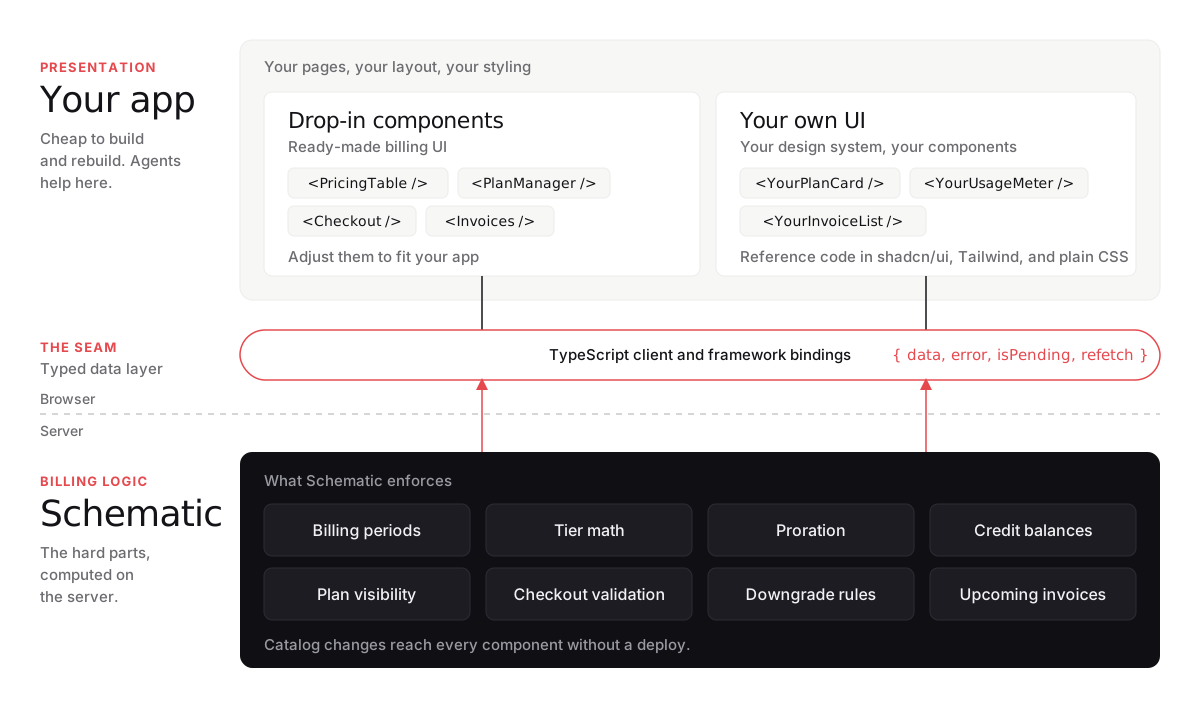
Why we still own the hard parts
We want to get out of your way and let you build the UI you want. Your agent can rebuild the markup as often as you like, and the reference code in the dashboard gives it a head start. The billing underneath has too many edge cases to vibe-code, and the mistakes don't show up until a customer gets the wrong invoice.
A customer upgrades mid-month and adds two seats, and checkout has to show today's prorated charge and the next invoice, both to the cent. A team has three credit grants, one of them expired, and the balance has to count only the two that are live. A plan includes 10,000 API calls, and the usage meter has to show what the overage will add to the next invoice before it lands there.
Each of these is a small piece of UI on top of logic that has to be right every time. If an agent wrote that logic into your repo, every bug in it would be yours to find and fix.
What we ship instead
The code comes in three layers, split along that same line.
At the bottom is a typed client in plain TypeScript, with no framework in it. Pure functions turn its data into view models, with text ready for internationalization . This is the layer we test most heavily, since everything else depends on it.
Above that are thin framework bindings. We shipped React first and are releasing Vue and Angular next. In React they're hooks like , , and , each returning .
typescript
useCompanytypescript
useInvoicestypescript
useCheckouttypescript
{ data, error, isPending, refetch }On top are the drop-ins. , , , , and the rest use the same public bindings you would. We built them that way on purpose. They double as a reference implementation, and they prove the public layer is enough to build every billing screen. Start with a drop-in, move to your own markup later, and the data layer doesn't change.
typescript
PricingTabletypescript
PlanManagertypescript
Checkouttypescript
InvoicesHere's the same invoice list both ways, in React.
typescript
import { Invoices } from "@schematichq/schematic-components/elements";
import { useInvoices } from "@schematichq/schematic-react";

// Drop-in
export const Billing = () => (
  <Invoices showStatus query={{ includePending: true }} />
);

// Same data, your components
export function MyInvoices() {
  const { data, error, isPending, refetch } = useInvoices();
  return (
    <InvoiceList
      invoices={data}
      loading={isPending}
      error={error}
      onRetry={refetch}
    />
  );
}
The Components page in the dashboard has reference code for each drop-in in shadcn/ui, Tailwind, and plain CSS, plus a prompt you can hand an agent. Copy it freely. It's yours to change.
How we keep it safe
Moving billing UI into your code raises a fair question about what ends up in the browser. We send it only what it needs to render, already decided on the server.
Your backend mints a temporary access token scoped to one company, and the browser uses it to read that company's catalog and billing state. That response lists just the plans the company can buy, in the order and billing periods your catalog sets. Prices arrive ready to display, tiers included. Credit balances are up to date, and the upcoming invoice already has the customer balance applied. The browser formats numbers and holds UI state like the period toggle.
Checkout works the same way. It's a persisted resource on our API, and the server validates the plan, add-ons, and proration before anything touches Stripe. Card details go straight to Stripe through Stripe Elements.
typescript
/checkoutsWhere this goes
The next components we're building move further into your product. A preview of what an action will cost before the click. The moment a limit stops an action, with the reason and the way past it. A forecast of the day a team runs out of credits.
None of those live on a settings page. They sit inside your app, next to the button that spends the money, and they have to look like everything around them because they're part of it. That was never going to come out of a builder. It comes out of your own code, reading numbers it can trust.