 Ryan Echternacht
Supabase offers an open-source backend-as-a-service tool with a Postgres database, authentication, file storage, instant APIs, and edge functions. It is pitched as an alternative to Firebase, but with SQL instead of NoSQL.
The platform presents an effective counter-position on price. Supabase bills compute per instance size and offers more monthly active users (MAUs) than competitors.
Supabase's pricing page also stands out for its predictability. It clearly shows what is included in each plan and which features are subject to overage pricing. Plus, cost control is on by default for all customers to protect against runaway spending.
This guide breaks down Supabase's pricing page and how much it costs to build and scale apps using the tool.
TL;DR
- Supabase is a masterclass in predictable pricing by using tiered plans, transparent overage policies, cost control, linked docs, and detailed FAQs.
- It offers four pricing plans: Free for basic projects, Pro ($25/month) for production apps, Team ($599/month) for scaling companies, and Enterprise for large organizations with custom needs.
- Most Supabase costs come from overages, not the base plan. Your total bill depends on database size, bandwidth, monthly active users, and storage size, among other factors.
- Companies can pay for add-ons like custom domains, point-in-time recovery, and HIPAA projects.
- Supabase lets developers build apps faster. Monetization platforms like Schematic help you control pricing, packaging, and feature access without hard-coded logic.
Supabase Pricing Page Breakdown
Supabase's pricing page features a straightforward, developer-friendly design.
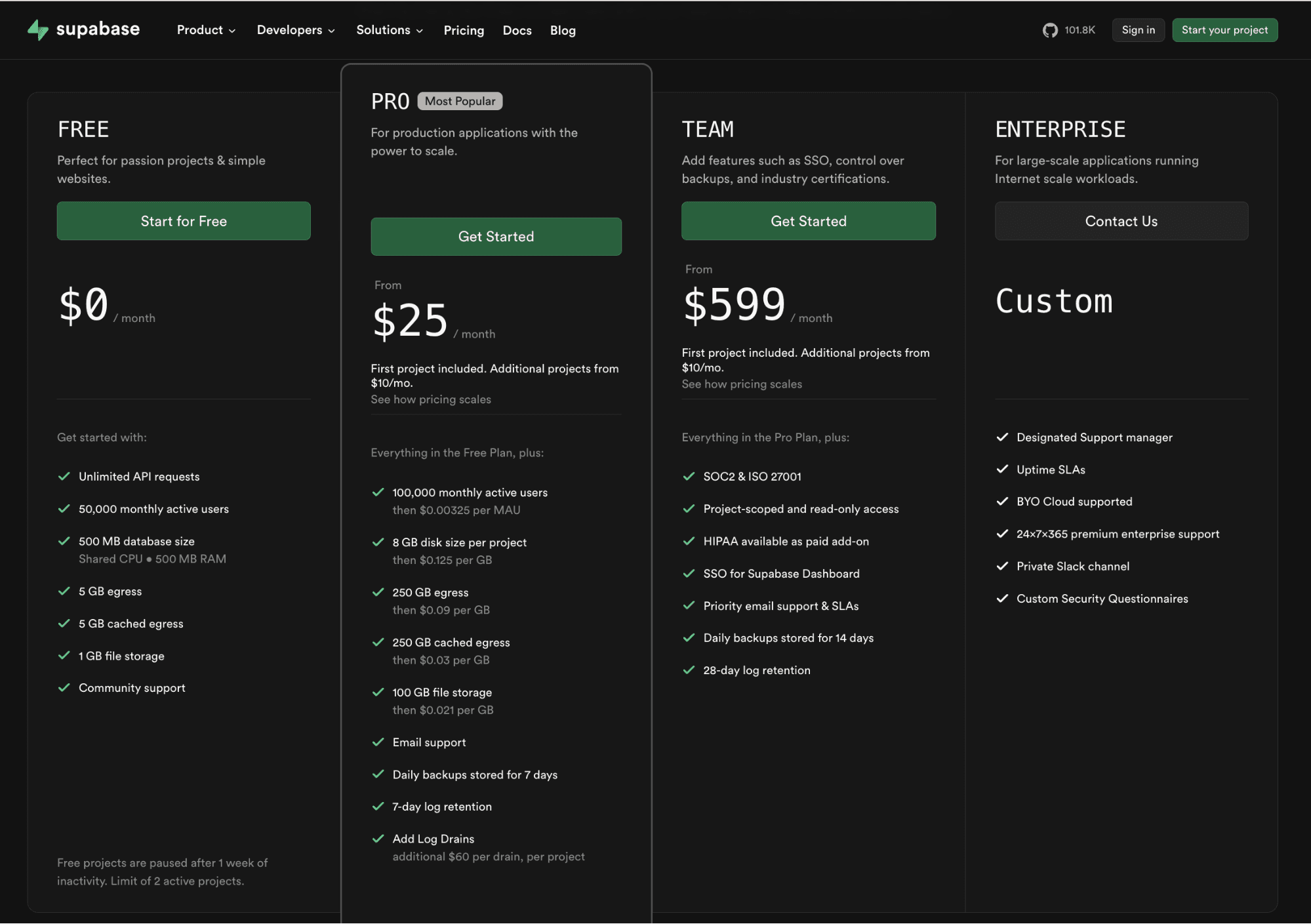
Right off the bat, you can see that Supabase is using tiered pricing.
There's a generous free tier that appeals to hobbyists and startups. On the other hand, paid plans (Pro, Team, and Enterprise) cater to growing teams and larger businesses.
Source: Supabase.com
Supabase's pricing model creates cost predictability. Each tier shows included features, usage-based billing metrics, and overage policies for usage beyond limits.
Supabase also links to relevant documentation pages that explain how billing works. Meanwhile, a detailed FAQ section answers pricing questions to clear remaining doubts.
What sets Supabase apart is cost control on the Pro plan. It has a spend cap enabled by default to prevent runaway bills and keep costs predictable.
Supabase is one of the best SaaS pricing page examples we have seen. And Supabase's billing experience is just as strong as the pricing page.
Whether you’re a solo developer or an enterprise, Supabase adapts to your unique buying journey. The company also delivers a transparent, self-service purchasing experience everywhere, from onboarding flows to the customer portal.
Supabase Pricing Plans Explained
Supabase offers four predictable pricing plans: Free, Pro, Team, and Enterprise.
Most teams start with Supabase's Free plan when building their apps. Later on, they transition to Pro and Team plans as project needs expand. Those requiring custom pricing often choose Supabase's Enterprise plan.
Free Tier
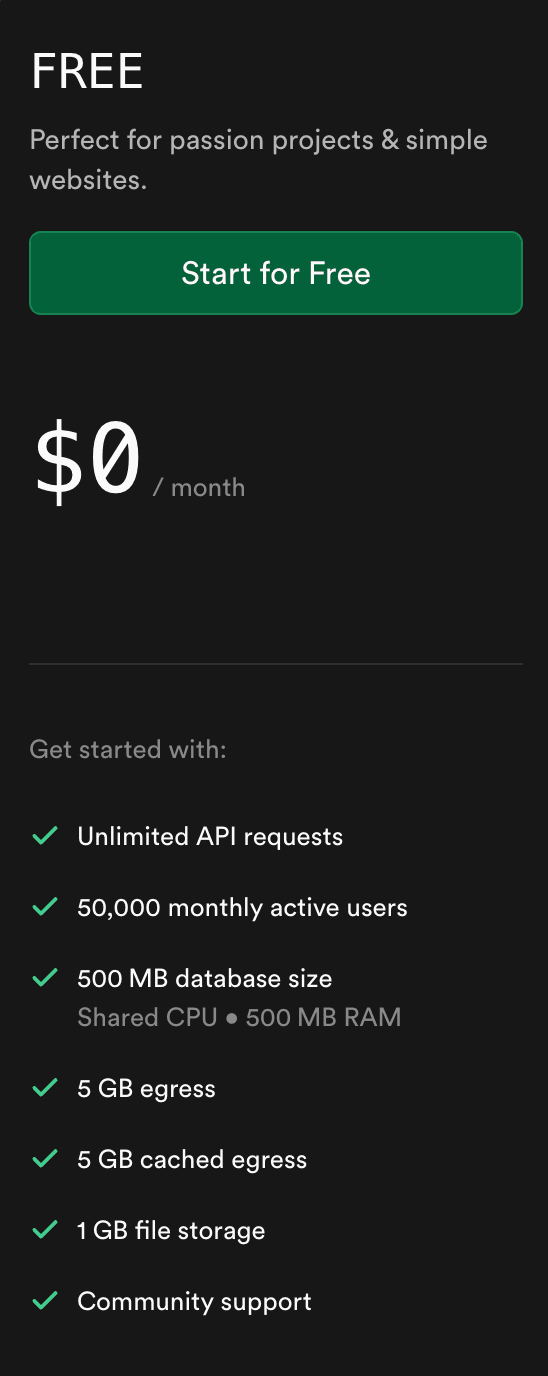
Supabase's Free plan is built for hobby projects, learning, and basic website development.
Source: Supabase.com
You can use a Postgres database and access community support without any upfront cost. You also get unlimited API requests.
However, Free tier limits apply.
There’s a cap of 50,000 monthly active users, a 500 MB database size, 5 GB egress, and 1 GB file storage.
In the Free tier, projects are limited to 2 as well. These free projects are automatically paused after one week without activity.
Supabase's Free plan is best for developers building prototypes, internal tools, or early MVPs. It is not a good fit for production apps because of uptime limits and resource caps. Most businesses will outgrow this plan once they need stable performance or additional projects.
Pro
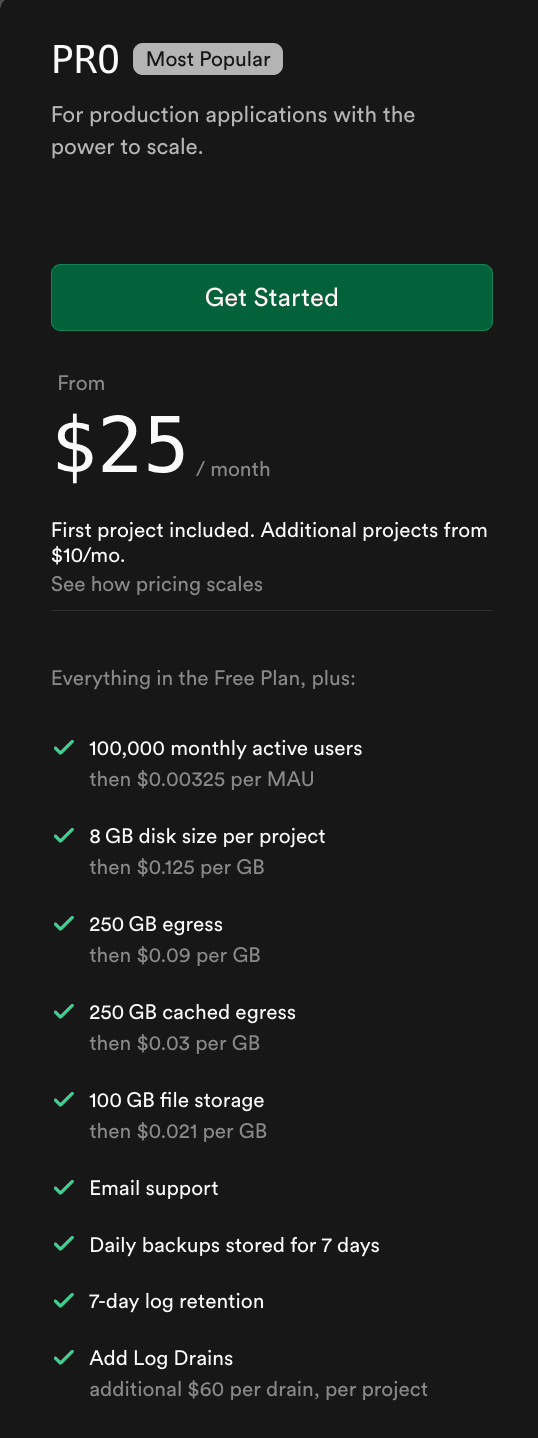
Pro is Supabase's most popular pricing plan. It is the main starting point for companies building production applications.
Source: Supabase.com
At $25/month, the Pro plan supports up to 100,000 monthly active users. It also includes a larger database size (8 GB per project), more storage (100 GB), higher bandwidth consumption (250 GB egress), and daily backups for seven days. Plus, it unlocks email support.
The first Supabase project in Pro is included. However, additional projects cost $10/month.
The Pro plan introduces usage-based pricing with overage charges. You can pay as you go for additional usage that exceeds the plan limits.
To keep costs under control, Supabase enables a spend cap by default. You can start small and expand over time without worrying about runaway billing.
You also have the option to switch off the spend cap to enable usage-based scaling beyond Pro's included quota.
Supabase's Pro plan offers a balance between cost and flexibility. It suits early-stage startups or developers launching real-world applications.
Team
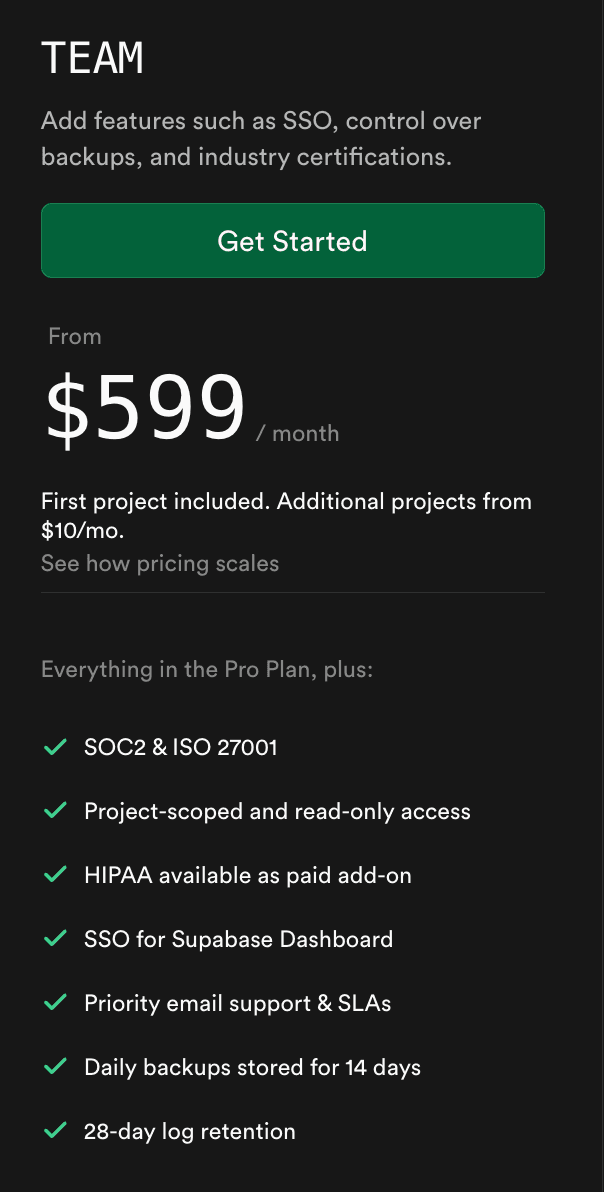
The Team plan supports companies that require more control, security, and priority support.
Source: Supabase.com
At $599/month, Supabase's Team plan includes everything in Pro plus compliance support for SOC2 and ISO 27001.
You also get single sign-on (SSO) for the Supabase dashboard, longer backup retention (14 days), and log storage for 28 days.
A single project comes at no additional cost, but extra projects are billed at $10/month.
If you need to secure protected health information (PHI), HIPAA is available as a paid add-on.
The Team plan is best for companies managing multiple environments or working with sensitive data.
Enterprise
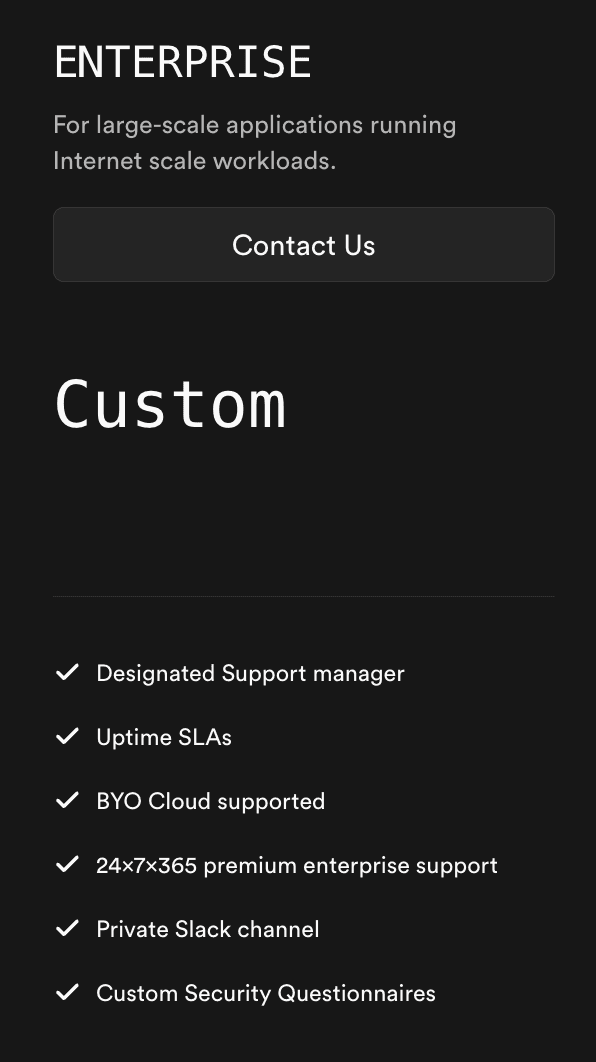
Supabase's Enterprise plan is designed to handle large-scale production apps.
Source: Superbase.com
Enterprise offers custom pricing, which is negotiated directly with Supabase. A designated support manager and a private Slack channel ensure premium support 24/7.
Additionally, Enterprise features uptime agreements, security questionnaires, custom project-scoped roles, and a 90-day log retention.
It even allows you to bring your own cloud storage provider, providing greater flexibility for storage-heavy applications.
Choose the Enterprise plan if you're a large organization operating in a highly regulated industry and handling internet-scale workloads.
How Much Does Supabase Actually Cost? Overages That Apply
Each Supabase plan includes generous usage allowances that reset every month. However, when you exceed those usage limits, you pay for overage charges tied directly to infrastructure costs. These can affect your total monthly bill.
Let's discuss the hidden costs of using Supabase below.
Compute Instances
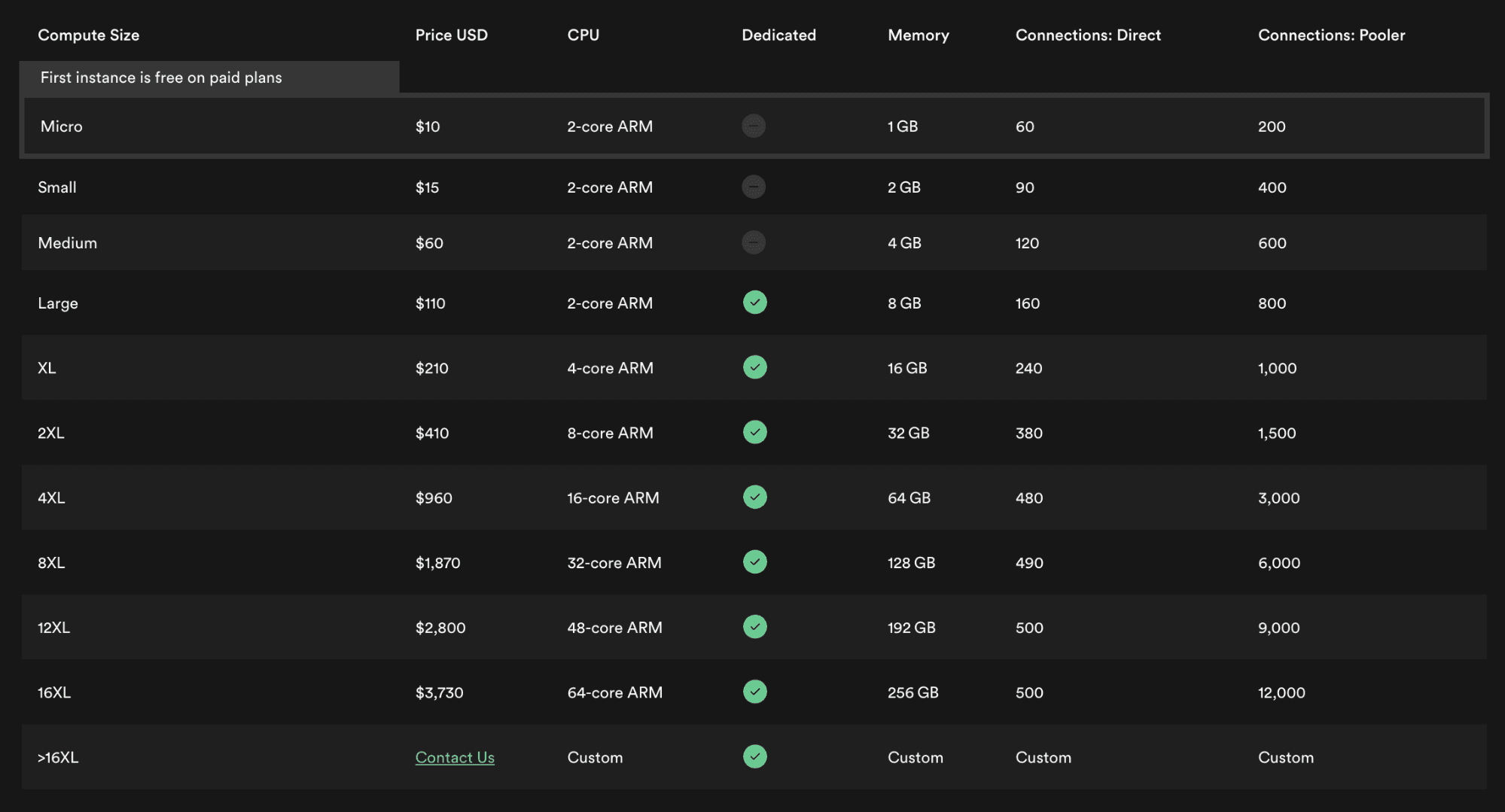
Each Supabase project runs on its own Postgres server. You pay for the compute instances of that server.
All paid plans include $10 per month in compute credits. You can use those credits to cover the cost of one Micro instance. Alternatively, use the credits to offset the cost of any other instance.
Source: Supabase.com
Prices increase based on the compute size you choose. For example, a small instance starts at $15, while a medium compute size costs $60. Larger instances can cost hundreds or thousands of dollars per month.
That means compute will be one of the biggest cost drivers as your application grows.
Disk Configurations and Storage Performance
Disk configuration affects how your database performs. Faster disks and higher storage capacity improve performance, but they also increase the total cost you'll pay every month.
By default, Supabase uses General Purpose disks with a maximum size of 16 TB. It includes the following:
- 8 GB database storage (an extra GB costs $0.125)
- 3,000 IOPS (each IOPS beyond the limit costs $0.024)
- Throughput of 125 MB/s (overage of $0.095 per MB/s)
If you need faster speeds, higher storage (60 TB maximum), and greater durability, you can switch to High Performance disks for an additional cost.
Supabase charges $0.195 per GB and $0.119 per IOPS, where the cost of throughput scales automatically with IOPS.
Database Size
Supabase's Free tier comes with a 500 MB database size per project. If you want a larger disk size, you'll need to upgrade to paid plans.
Each project on the Pro and Team plans includes an 8 GB disk size. Once you exceed this limit, you pay $0.125 per GB per month.
The cost grows as your product stores more user data, logs, or analytics. Most production applications can quickly hit this limit as usage increases.
Bandwidth (Egress)
Supabase charges customers based on all outgoing traffic in the database, storage, Auth, API, edge functions, and log drains. It bills cache hits separately.
Supabase's Free tier limits outgoing traffic bandwidth (egress) to 5 GB per month.
On the other hand, Pro and Team plans offer a 250 GB limit. Beyond that, egress costs $0.09 per GB.
Branching
Branching, a unique feature for paid plans, lets you create separate database environments for application testing and development. Once you're ready to implement the changes, you can merge branches to update your production instance.
Each branch is billed per hour. The cost is $0.01344 per branch per hour.
If you run many branches or leave them active for long periods, costs can add up quickly.
Monthly Active Users
Supabase Auth tracks monthly active users. Each user who logs in, interacts with your app, or refreshes their token affects your total MAU.
You get 50,000 monthly active users with the Free tier. Paid plans include 100,000 MAUs. After that, you are charged $0.00325 per user. Customers on the Enterprise plan can customize the MAUs they pay for.
The number of monthly active users in all plans resets every billing cycle.
Advanced Multi-Factor Authentication (MFA)
Multi-factor authentication requires users to verify their identity using two or more verification factors. Supabase implements MFA via an App Authenticator and phone messaging.
This feature is only available on paid plans. It costs $75 per month for the first project, then $10 per month per additional project.
Single Sign-On (SSO)
Supabase Auth supports enterprise-level SSO. Users can log in through any identity provider compatible with the SAML 2.0 protocol, such as Microsoft Active Directory and Okta.
Pro and Team plans allow 50 monthly active users to use SSO. If more users need this feature, you need to pay $0.015 per MAU.
Storage Size
Supabase Storage offers different bucket types for storing user-generated content, analytics data, or vector embeddings.
The platform bills the sum of all the objects' sizes in your storage buckets.
The Free plan limits storage to 1 GB. Meanwhile, paid plans get a generous 100 GB. In case you need more storage, you can pay $0.021 per extra GB per month.
Storage costs are different from database storage fees. They require separate tracking.
Cached Egress
Cached egress refers to storage traffic served from Supabase's CDN via cache hits. It is typically used for public-facing assets like images or videos.
The Free plan comes with 5 GB of cached egress.
Pro and Team plans include 250 GB at no additional cost, then charge $0.03 per additional GB. The overage fee is cheaper than uncached bandwidth, which suits high-volume content delivery.
Image Transformations
Supabase can process images on the fly, such as resizing or optimizing. This capability is only available in paid plans.
Pro and Team plans offer 100 origin images. After that, it costs $5 per 1,000 origin images.
If you don't use this feature, you can disable image transformations to prevent unexpected usage or extra costs.
Concurrent Peak Connections
Supabase measures how many users are connected to your database at the same time. It only looks at the total number of successful connections. Connection attempts are excluded from your usage and monthly bill.
In the Free tier, 200 users can simultaneously connect to Supabase Realtime.
For Pro and Team, 500 users are included. If you exceed this limit, you pay $10 per 1,000 connections.
Enterprise customers can customize the number of concurrent connections. They also receive a volume discount, where per-unit costs decrease as purchase quantity increases.
Messages
Messages refer to all activity going through Supabase Realtime. This includes database changes, broadcasts, and presence updates.
You get 2 million messages in Supabase's free tier.
Subscribing to paid plans provides you with 5 million messages per month. After that, it costs $2.50 per 1 million messages.
Each interaction counts toward your total messages. For example, if one database change is sent to 5 connected clients, that counts as 5 messages. If you send one message and 4 clients receive it, the total is 5 messages.
Edge Functions
Supabase's Edge Functions run server-side TypeScript functions closer to your users. They are useful for listening to webhooks or integrating your Supabase project with third-party apps.
Supabase charges based on the sum of all Edge Function invocations throughout the billing cycle.
Free plan users receive 500,000 invocations without an upfront cost.
Those on the Pro and Team plans get 2 million invocations per month. Beyond this limit, it costs $2 per 1 million invocations.
Log Drain
Supabase's log drain allows paid plan users to send all logs to one or more desired destinations.
Each log drain costs $60 per month. On top of that, you are charged $0.20 per million events processed and $0.09 per GB egress.
Supabase only bills for events that are processed and delivered to external destinations.
Supabase Add-Ons You Can Purchase
Supabase also offers add-ons that extend core product features. These are optional and incur additional costs based on project needs.
Custom Domains
Custom domains let you use your own domain name for Supabase projects. These deliver a branded experience to your users.
Supabase supports two types of domains:
- Custom domains
- Vanity subdomains for experiment projects
Supabase charges a flat fee for domains. Each one costs $10 per month.
Domains are a simple add-on, but they become important when building customer-facing apps. Most production apps will use a custom domain for branding and trust.
Point-in-Time Recovery
Point-in-time recovery allows you to restore your project to a specific moment in time. This feature helps protect against data loss, bugs, or accidental changes.
Pricing starts at $100 per month for a 7-day retention period.
The Enterprise plan unlocks a longer retention period of up to 28 days.
HIPAA Projects
HIPAA projects are designed for companies building healthcare apps in Supabase and handling protected health information.
Only organizations in the Team or Enterprise plan can pay for this add-on. The actual cost varies and is hidden from Supabase's pricing page.
Build and Scale Apps on Supabase, Ship Any Pricing Model With Schematic
Supabase gives companies a faster way to build apps with a database, auth, storage, and APIs in one platform. It provides backend-as-a-service so teams can focus on product development.
However, as your application scales, pricing and billing can become harder to manage. This is where Schematic comes in.
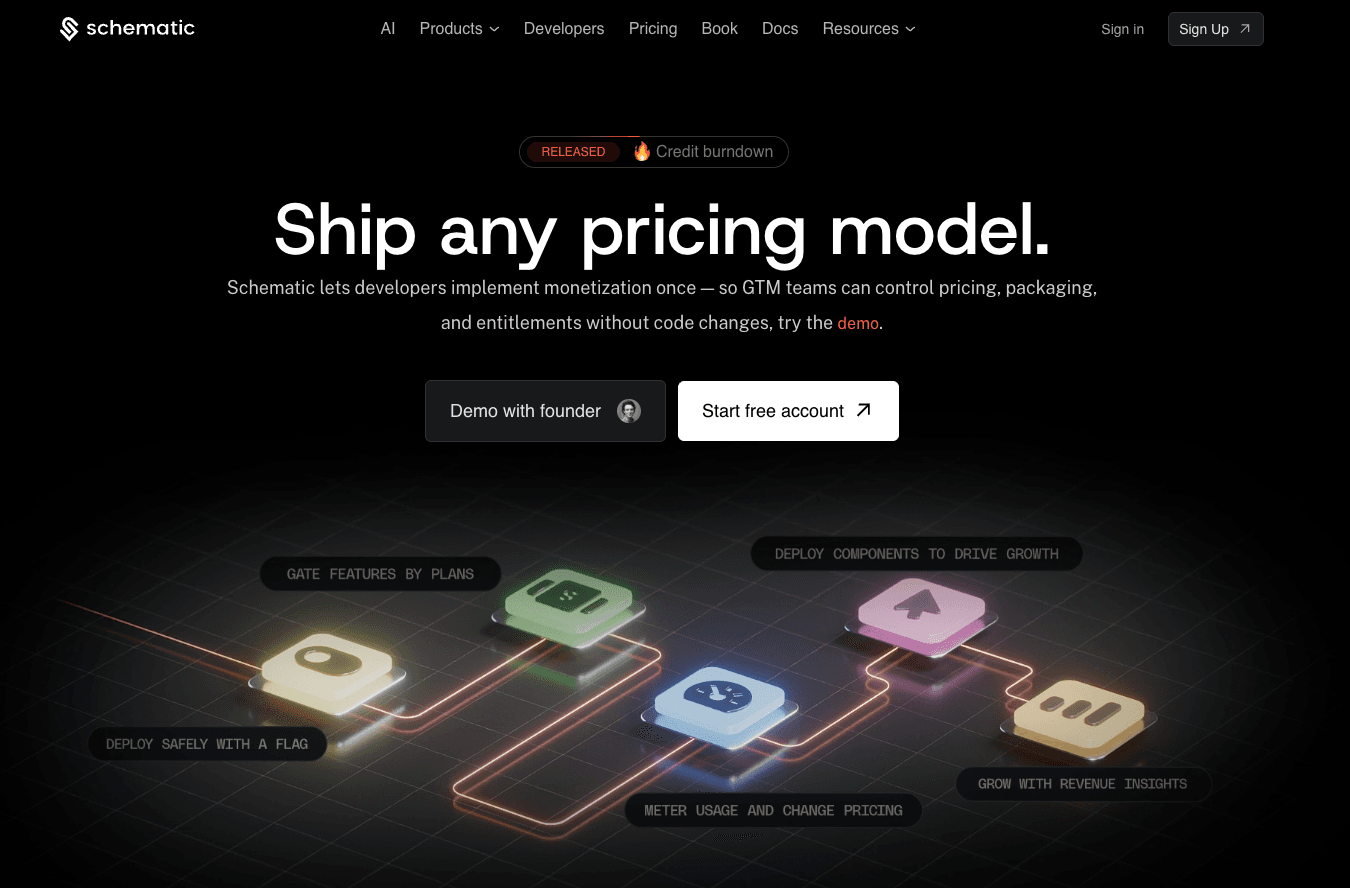
Schematic is the monetization operating system for modern SaaS and AI companies. It acts as the system of record for plans, software entitlements, limits, trials, credits, add-ons, and exceptions.
Schematic, built on Stripe, decouples billing logic from application code. Stripe handles payments and invoices, while Schematic owns what customers can do inside the product.
Engineering stops writing billing and entitlement code. Schematic evaluates and enforces access in-product at runtime.
GTM teams can ship any pricing model and iterate on packaging without relying on developers.
FAQs About Supabase Pricing
Is Supabase costly?
Supabase is not costly for small teams or early-stage startups. The Free tier offers generous limits, while the Pro plan starts at $25/month. Costs only increase when your app uses more compute, storage, bandwidth, monthly active users, or paid add-ons.
Is Supabase cheaper than AWS?
Supabase can be cheaper and easier to budget than AWS because it offers predictable pricing plans. AWS may provide more services, but pricing can be harder to predict across multiple products.
Is Supabase 100% free?
Supabase offers a 100% free plan. You don't have to pay anything as long as you stay within plan limits. However, most companies trying to build real-world applications in Supabase usually need a paid plan.
Is Supabase really worth it?
Yes, Supabase can be worth it for developers and organizations that want to build and scale apps faster. Supabase significantly speeds up app development by unifying a PostgreSQL database, authentication, edge functions, storage, and API calls.