 Ryan Echternacht
Pricing decisions often feel permanent once they land in code. Teams hesitate to adjust plans, limits, or price points because every change risks breaking billing flows, access rules, or existing contracts.
Over time, pricing stalls and manual workarounds creep in.
Clear pricing models reduce that pressure. They create repeatable patterns for how customers pay and how products respond to growth and usage, without forcing teams to rewrite logic every time pricing changes.
Below are seven common SaaS pricing models, with real pricing page examples that show how teams structure pricing to stay flexible as products scale.
TL;DR
- Seven common SaaS pricing models are seat-based, pay-as-you-go, prepaid usage (credit-based pricing), tiered features, flat-rate, performance-based, and freemium pricing.
- Most SaaS products use hybrid pricing, combining seats, usage, credits, add-ons, and trials to support self-serve and sales-led motions.
- Common hybrid setups include seat-based access with usage expansion, tiered plans with add-ons, base subscriptions with overages, and freemium entry with paid upgrades.
- Pricing models only work when enforced at runtime, which is why teams use product-layer infrastructure like Schematic to keep plans, entitlements, limits, and usage aligned with billing.
SaaS Pricing Explained
SaaS pricing defines how customers pay for a SaaS product and how your product grants and limits access over time. It covers how you package plans, set limits, manage entitlements, track usage, and move users from a free version to a paid plan as their needs grow.
For SaaS businesses, this creates predictable recurring revenue through subscriptions and renewals, which supports annual and monthly recurring revenue (ARR and MRR) planning.
For customers, SaaS pricing lowers upfront cost, supports growth over time, and keeps access tied to current product capabilities rather than one-time purchases.
A solid pricing setup also supports different pricing models and varying price points, so you can serve new users, growing teams, and larger accounts without rebuilding pricing logic each time.
7 Common SaaS Pricing Models Examples
Below are popular SaaS pricing models with real pricing page examples, showing how teams package access, usage, and expansion in production products.
1. Seat-Based Pricing
Seat-based pricing ties what you charge to the number of users who can access the product.
Each person counts as a seat and gets the same core software entitlements. When a team grows, spend grows with it, even if usage per person stays light.
You may see this model where access itself creates value. Collaboration tools, shared dashboards, and workflow visibility all benefit from adding more people, not necessarily from heavier usage per person.
If coordination drives adoption more than raw consumption, this pricing stays intuitive for buyers and easy to reason about internally.
Pricing Model Example
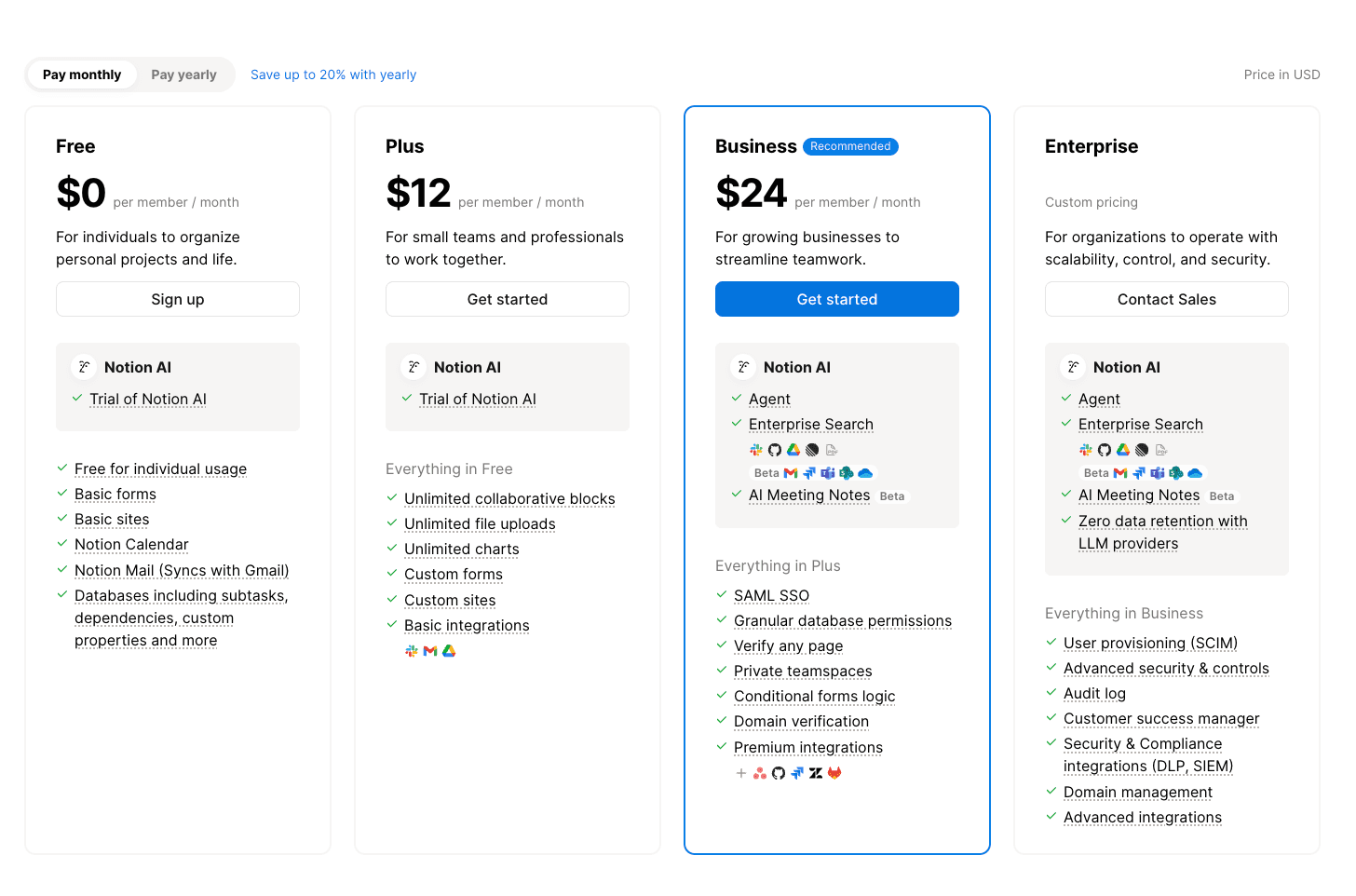
Source: notion.com
Pros
- Simple to explain to buyers in different customer segments
- Revenue grows as teams add users
- Forecasting stays predictable with stable pricing tiers
Cons
- Encourages seat hoarding to control cost
- Breaks down when usage varies widely per user
- Weak fit for products where value comes from usage rather than access
2. Pay-As-You-Go Usage Pricing
Pay-as-you-go pricing bills customers strictly on what they consume during the billing period.
There is no baseline fee and no upfront commitment. Each request, event, or action increases spend as it happens, which makes the cost directly reflect real usage.
It fits products serving a specific target market with variable consumption. It also lets customers start small without guessing future volume or negotiating plans up front.
To keep trust high, teams usually pair this model with strong metering and visible spend feedback inside the product, so cost never feels hidden or arbitrary.
Pricing Model Example
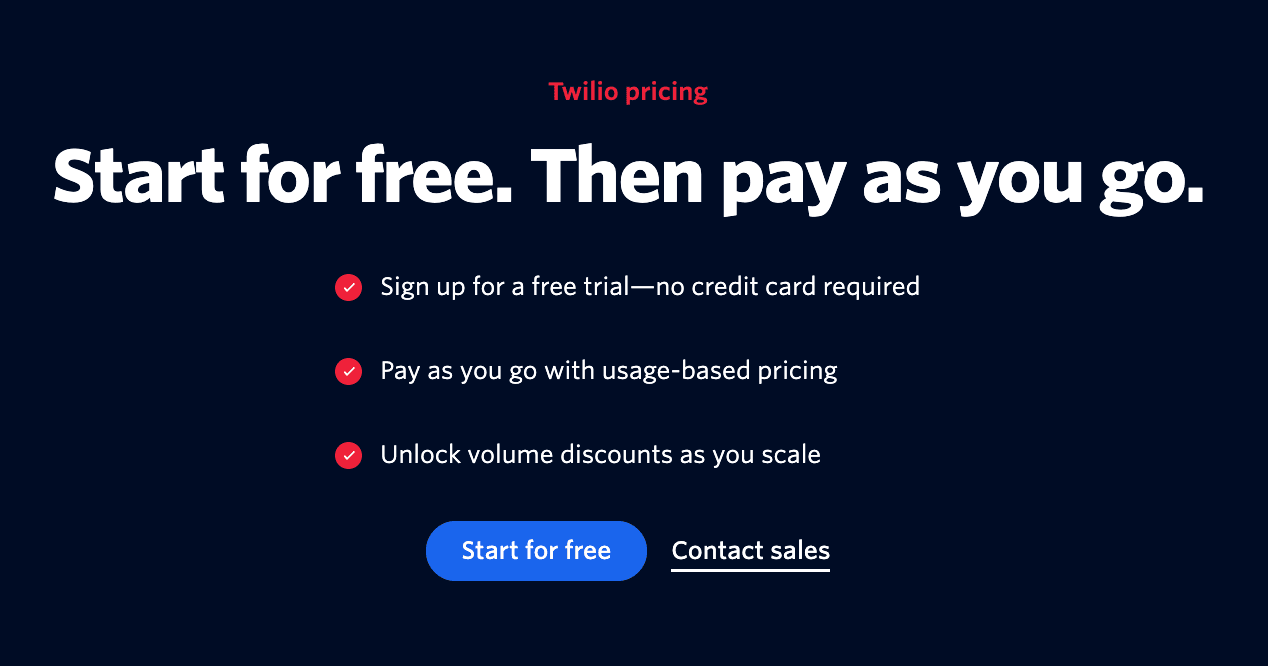
Source: twilio.com
Pros
- Low barrier to entry for new customers
- Strong value-based pricing alignment between usage and cost
- Supports technical products with unpredictable demand
Cons
- Revenue generated fluctuates month to month
- Forecasting becomes harder without commitments
- High price sensitivity when spend visibility lags usage
3. Prepaid Usage (Credit-Based Pricing)
Prepaid or committed usage pricing asks customers to commit to a defined amount of usage before they start consuming. Customers prepay for a usage balance, and the product deducts from that balance as activity happens.
Spend is known up front, while consumption remains flexible.
Balances may reset on a schedule or expire after a defined window. Customers approve spending in advance but retain control over how quickly they use it.
This model introduces predictability into usage pricing without switching to a flat subscription.
Pricing Model Example
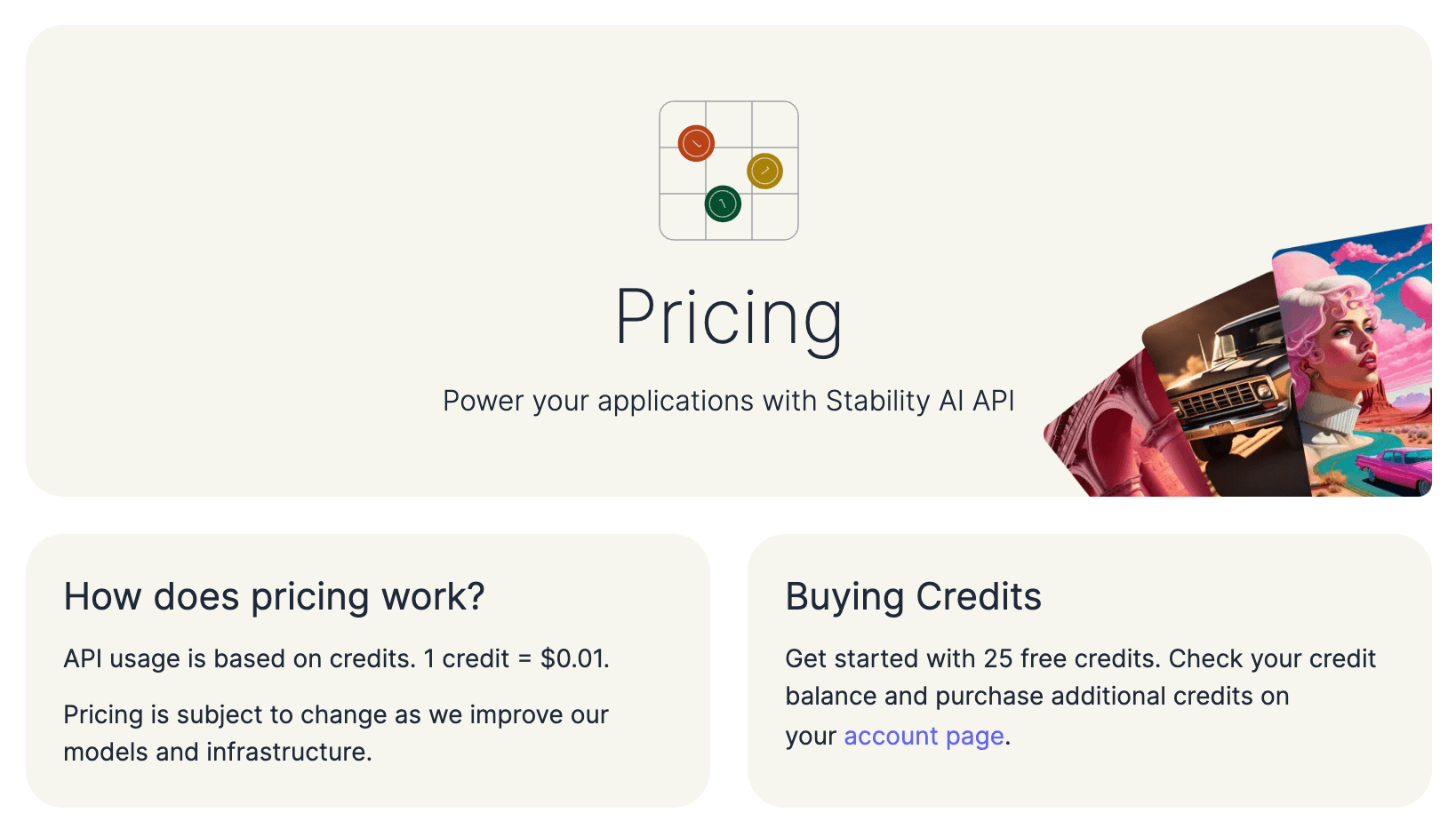
Source: platform.stability.ai
Pros
- Predictable spend for customers
- Clear value framing through credits
- Strong fit for AI and consumption-driven products
Cons
- Requires accurate in-product usage tracking
- Confusion around resets and expirations
- Added complexity around replenishment and top-ups
4. Tiered Feature-Based Pricing
Tiered feature-based pricing separates plans by what customers can do, not how much they use the product.
Each tier unlocks a specific set of features, controls, or integrations. Usage may vary, but feature access is what drives upgrades.
You can choose this per-feature pricing model when different roles need fundamentally different tools. Operators, admins, and executives may all use the same product, but value comes from distinct capabilities.
Feature tiers make those boundaries explicit and help buyers self-select without complex usage math.
Pricing Model Example
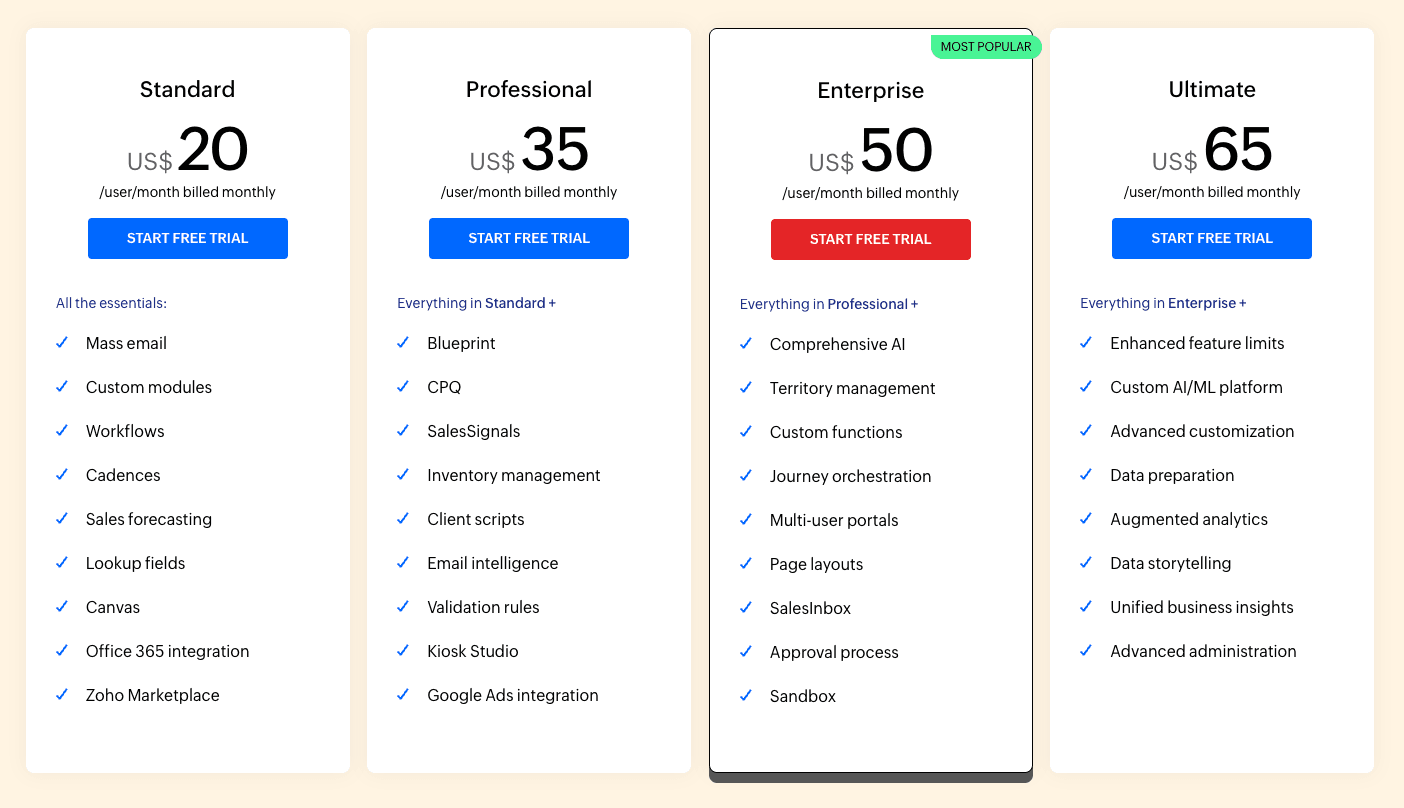
Source: zoho.com
Pros
- Easy plan comparison with clear different price points
- Strong alignment with persona-driven buying decisions
- Straightforward sales conversations for larger teams and enterprise companies
Cons
- Expansion slows once customers reach the highest tier
- Feature placement decisions create long-term lock-in
- Heavy users may extract more value without paying more
5. Flat-Rate Pricing
Flat-rate pricing offers one plan at one price. Every customer gets the same access.
There are no tiers, no usage questions, and no decisions about how many users are active. You pay once and unlock everything.
Teams choose this when simplicity matters more than precision and when the product delivers consistent value regardless of account size. Buyers like the certainty.
Internally, pricing stays easy to manage. Flat pricing often shows up early, before teams want to invest in more complex SaaS pricing strategies or optimize for long-term customer loyalty.
Pricing Model Example
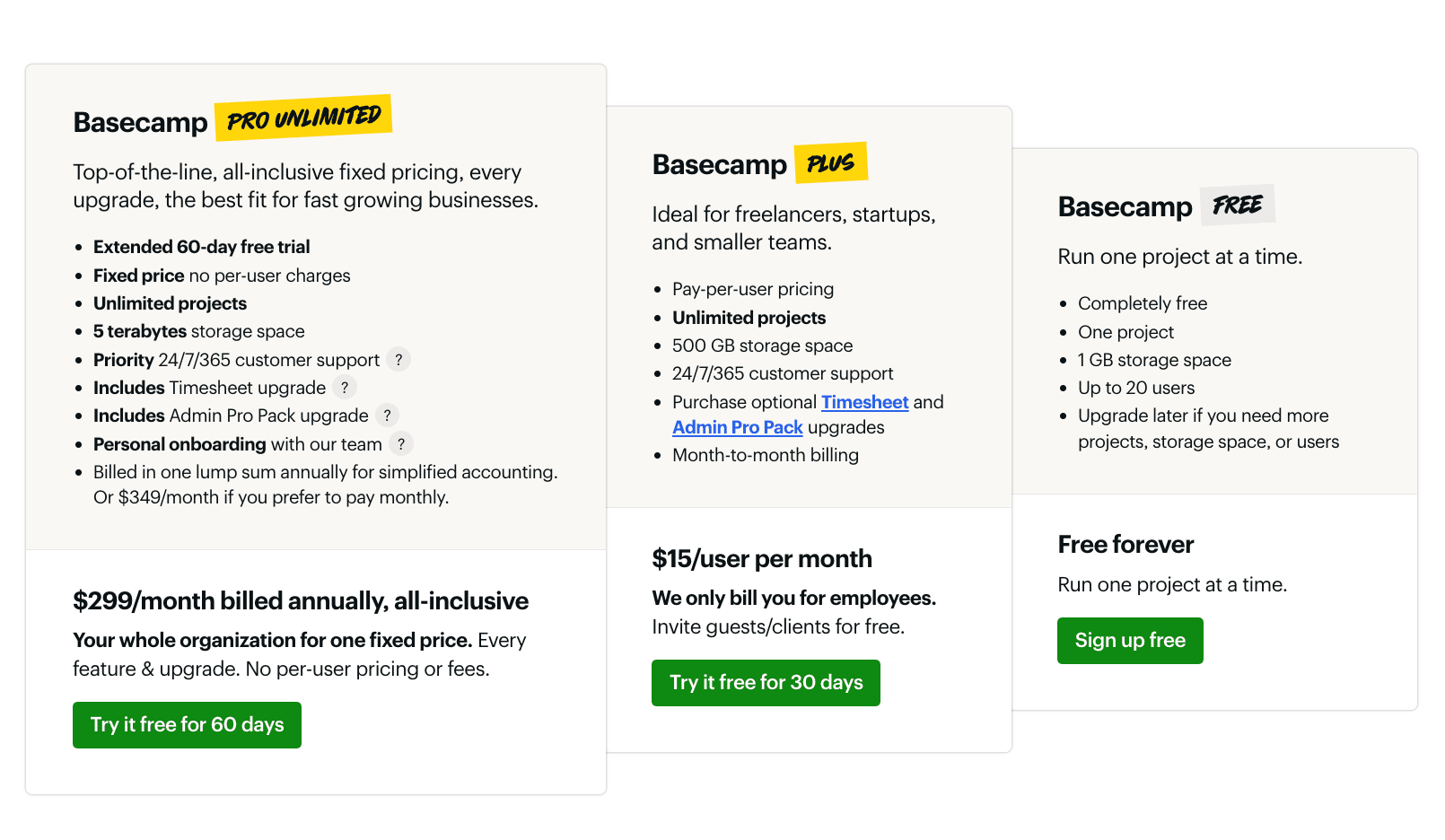
Source: basecamp.com
Pros
- Extremely simple pricing structure
- Clear value proposition with no comparison friction
- Faster buying decisions without plan selection
Cons
- No built-in expansion as accounts grow
- High-usage customers pay the same as light users
- Becomes fragile once usage and account size diverge
6. Performance-Based Pricing
Performance-based pricing charges when outcomes happen, not when users log in or consume capacity.
Value is defined by results that the product can measure directly, such as issues resolved, revenue influenced, or actions completed by AI.
This model appeals to buyers who resist a fixed monthly price and want costs tied to tangible results. Teams adopt it when usage metrics fall short, and outcomes better represent the model for your SaaS.
The tradeoff is operational complexity, since performance needs clear definitions and reliable attribution.
Pricing Model Example
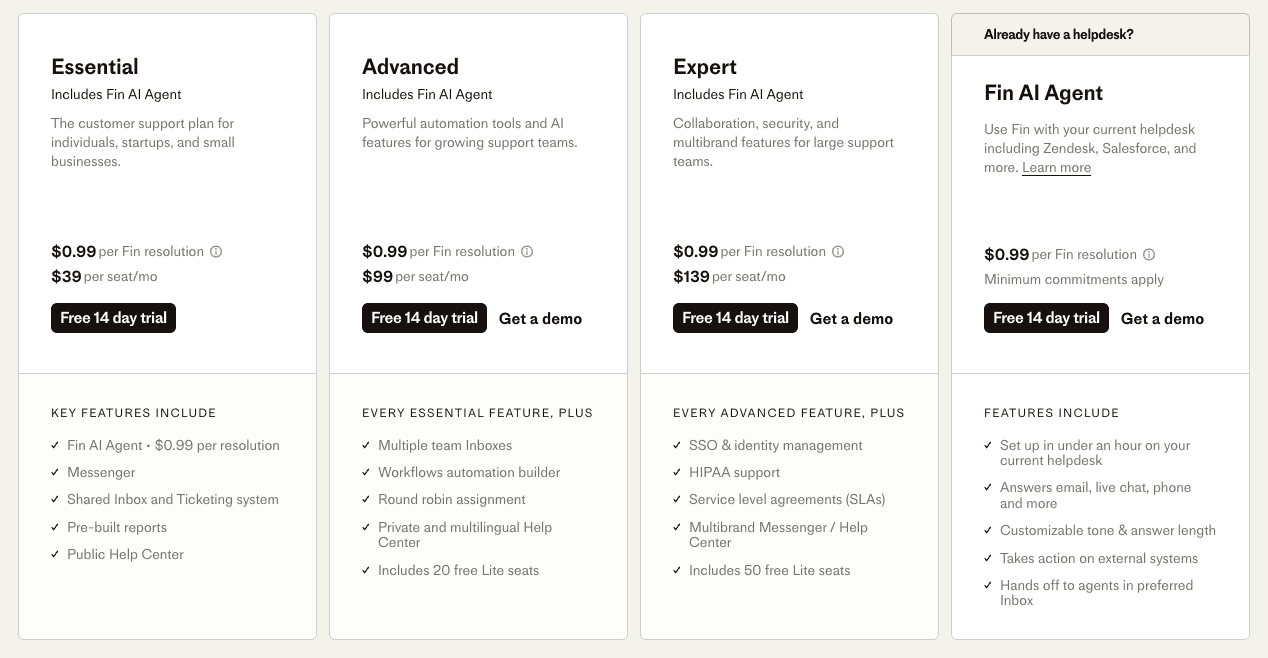
Source: intercom.com
Pros
- Strong value alignment with customer outcomes
- Easier ROI justification than cost plus pricing or a freemium model
- Differentiates from competitor pricing built on seats or features
Cons
- Measurement and attribution complexity at scale
- Disputes over performance definitions and edge cases
- Harder to standardize contracts than a tiered pricing strategy or a per-feature pricing model
7. Freemium (Acquisition Model)
Freemium gives users ongoing access to a limited version of the product at no cost. Core workflows remain usable, while upgrades unlock higher limits, collaboration scale, or advanced capabilities.
You can use this when product value is easy to experience early, and upgrades are tied to real usage moments, not time pressure.
The freemium model works best when entitlements, limits, and upgrade triggers sit directly in the product and convert active behavior into paid intent.
For many teams, the free plan supports the right pricing model at the top of the funnel without committing to a fixed monthly price too early.
Pricing Model Example
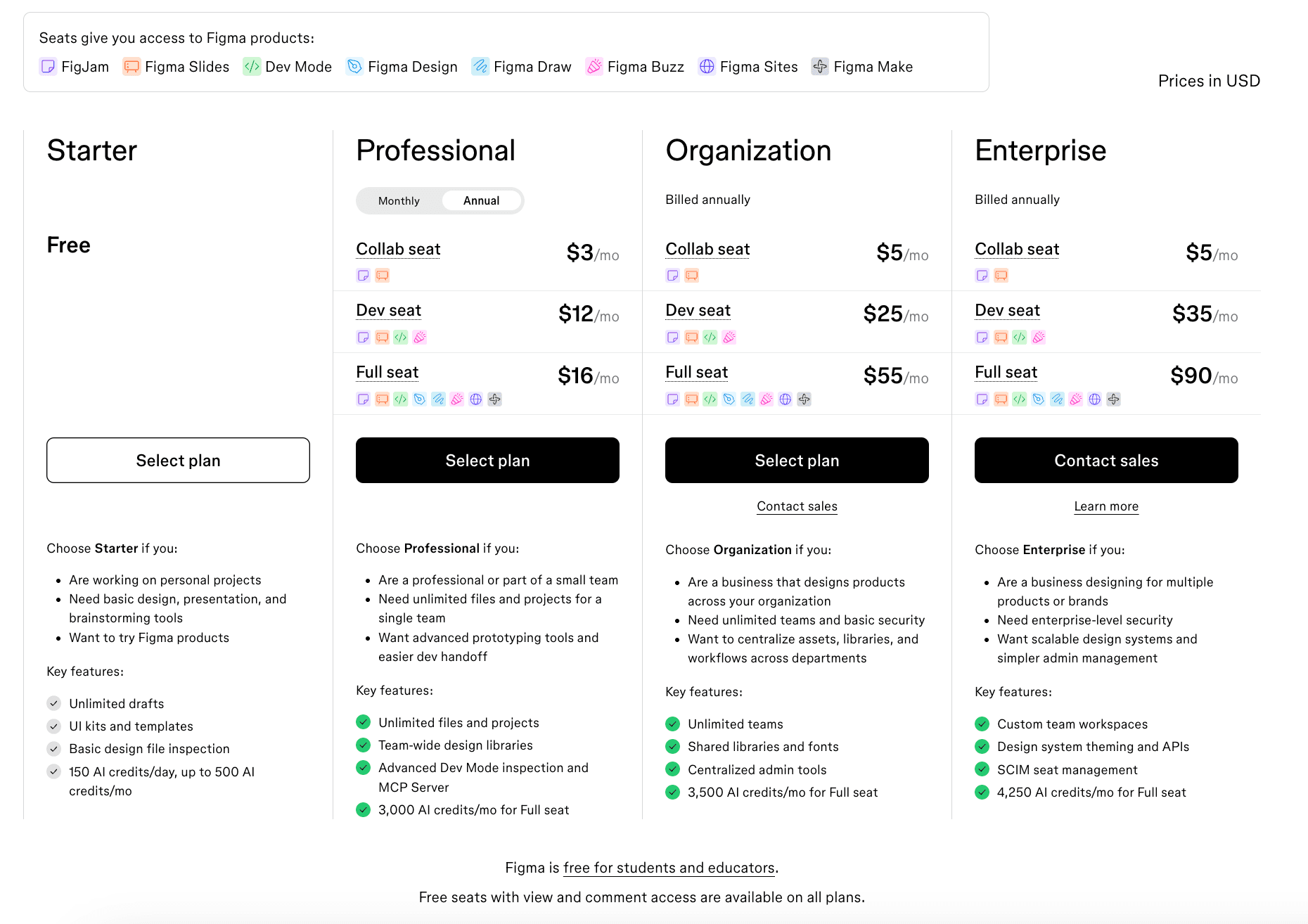
Source: figma.com
Pros
- Broad top-of-funnel for product-led motion
- Strong internal sharing and active user pricing paths
- Clear signal toward the most suitable pricing strategy once usage grows
Cons
- Free-to-play conversion risk without strict limits
- Support load from non-paying users
- Requires disciplined upgrade triggers to reach the best SaaS pricing model
Why Most SaaS Products Combine Pricing Models
Most SaaS companies start with a single pricing model, then hit limits once real customer needs show up.
Self-serve users want fast signup and simple pricing. Sales-led deals introduce custom terms, usage caps, and exceptions. Enterprise customers expect flexibility without renegotiation every quarter.
That pressure is evident in how teams price today. Research from OpenView Partners found that 46% of SaaS companies use a hybrid approach, combining usage-based pricing with subscriptions rather than relying on a single model.
A single pricing model rarely handles that mix well. Teams end up layering pricing logic through code, billing tools, and contracts, which increases risk and slows change.
Combining models lets you price different behaviors without fragmenting the product. Seat-based pricing governs access, while usage controls consumption. Features can separate plans. Credits can support sales-led deals.
A hybrid pricing model works when pricing rules map cleanly to entitlements, usage tracking, and limits enforced at runtime.
That alignment helps you support new signups, protect existing customers, and expand accounts without rewriting pricing logic each time.
Common Hybrid Pricing Combinations SaaS Teams Ship
Most teams combine the above pricing models to support real usage patterns and selling motions. These are the combinations you see in production SaaS products:
Seat-Based Access + Usage-Based Expansion
Teams use a per-user pricing model to control access, then layer usage-based pricing for consumption that grows independently of headcount.
AI products often charge per active user and add usage charges for tokens or compute. This pattern scales with customer usage patterns and avoids blocking growth when teams stop adding users.
Tiered Plans + Feature Add-Ons
A tiered pricing model defines core plans, while add-ons unlock advanced features for specific workflows.
This supports different target customers without forcing everyone into premium pricing. Product teams manage feature entitlements. RevOps handles add-ons without custom contracts.
Base Subscription + Pay-As-You-Go Overage
Some teams anchor pricing with a predictable subscription, then apply pay-as-you-go charges once limits are exceeded.
This balances revenue stability with expansion and reduces friction for potential customers who want predictable spending early.
Freemium Entry + Paid Expansion
A freemium pricing model lowers customer acquisition costs by letting users try the product with limits in place. Conversion happens when usage, features, or team size grows.
The product enforces those transitions cleanly, so free users convert into paying customers without sales intervention.
Choosing Pricing Models Is Easy, Making Them Work Is the Hard Part
Most SaaS teams understand pricing models in theory. The real challenge shows up later, when pricing needs to change, but the product cannot keep up.
Limits drift from plans. Trials linger longer than intended. Usage spikes without enforcement. Sales closes custom terms that engineering has to hard-code and remember forever.
Pricing strategy does not fix this on its own. Infrastructure does.
Modern SaaS and AI products rarely run a single pricing model. They mix seats, usage, credits, feature tiers, trials, add-ons, and enterprise exceptions. Each decision needs to show up in the product in real time, not weeks later through billing fixes or manual work.
This is where pricing models break down if they live only in Stripe, contracts, or spreadsheets.
Schematic: Pricing and Entitlements Infrastructure for SaaS
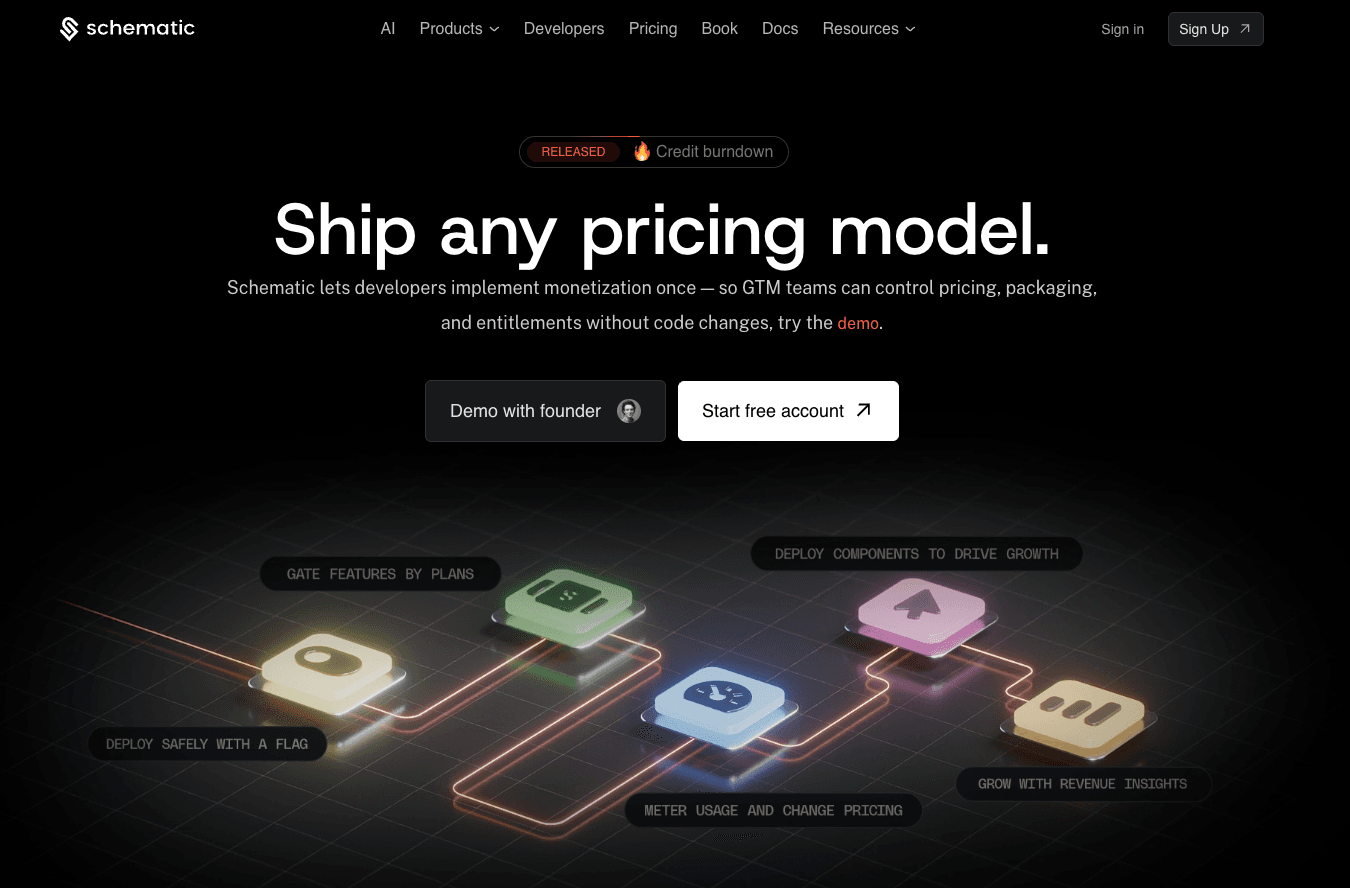
Schematic is the monetization infrastructure for SaaS and AI products. Built on Stripe, it sits between your product and your billing system and acts as the system of record for plans, SaaS entitlements, limits, trials, credits, add-ons, and exceptions.
Instead of baking pricing logic into application code, teams implement monetization once and manage it centrally:
- Product teams control plans, limits, and upgrades without deployments
- Engineering stops maintaining the custom billing and entitlement code
- GTM teams sell flexibly without breaking product behavior
- Usage, access, and billing stay aligned at runtime
Schematic evaluates access inside the product, not after invoices close. That means free users hit limits on time, trials expire as intended, usage triggers upgrades automatically, and enterprise overrides work without code forks.
Pricing shifts into a product capability that teams can change without rebuilding logic.
FAQs About SaaS Pricing Models Examples
What are the 4 pricing methods?
The four commonly referenced pricing methods in SaaS are seat-based pricing, usage-based pricing, flat-rate pricing, and pay-as-you-go pricing, with many products combining them into a hybrid structure rather than relying on a single approach.
Can a SaaS product use multiple pricing models?
Yes, most SaaS products use multiple pricing models at the same time, such as combining an active user pricing model for access with usage-based charges for consumption, to better match how different customers derive value.
When should teams change their pricing structure?
Teams should change their pricing structure when customer usage patterns, expansion paths, or sales motions no longer align with the current setup, and the existing model limits growth, flexibility, or enforcement inside the product.
How do teams choose the best pricing model for their SaaS product?
The best pricing model depends on how customers experience value, how usage scales, and how access should be enforced, which is why the best pricing strategy often combines more than one approach into a flexible model for your SaaS, such as an active user pricing example paired with usage limits or feature tiers.