SaaS and AI companies often start with simple product access rules. A few feature flags, basic permissions, and manual plan updates usually work early on.
That changes as pricing models, entitlements, environments, and customer access rules become harder to manage. One configuration change can affect billing behavior, feature access, usage limits, or production environments inside the product.
Clear audit history and granular permissions become more important once teams need to trace what changed, who made the update, and when the issue started.
Schematic offers audit logs and permissions to help SaaS teams review operational activity, manage production access, and track configuration changes related to feature access, entitlements, and pricing.
In this guide, we’ll explain how SaaS audit logs work, what teams should track, and why permissions and audit trails become more important as SaaS products grow.
TL;DR
- SaaS audit logs and permissions become more important as products scale, helping teams track operational changes and control access to pricing, feature flags, entitlements, and production settings.
- Audit logs track system activity such as feature flag changes, entitlement edits, and API requests to speed up troubleshooting, improve accountability, and support compliance.
- Granular teammate permissions help restrict internal access and reduce risky or accidental production changes.
- Together, permissions and audit history create a safety net for SaaS operations. Permissions help prevent unauthorized updates, while audit logs help teams investigate what changed when issues occur.
- Built on Stripe, Schematic combines audit logging, role-based permissions, entitlements, and monetization controls in one platform.
What Are SaaS Audit Logs?
SaaS audit logs record system events and user activity inside an application.
A searchable activity history helps teams keep track of configuration updates, API events, account activity, and access changes linked to defined actions inside the product.
Engineering teams can quickly review what changed, when it occurred, and which user ID or device ID triggered the action.
Product teams can trace feature flag updates, entitlement edits, plan changes, and permission adjustments without digging through multiple systems.
A good activity log helps organizations troubleshoot issues faster and document implementation details over time.
It also gives teams the ability to review modified data and confirm whether unexpected behavior came from a configuration change or another operational issue.
Why Audit Trails Become More Important as SaaS Products Grow
Audit trails become more valuable as SaaS products grow more complex.
Small configuration changes can affect pricing, feature access, customer entitlements, or production environments in ways that are difficult to spot immediately.
A strong audit logging feature helps engineering, product, and security teams review system history involving feature flags, permissions, billing configuration, and account activity.
Faster access to audit history improves incident response, supports investigations into unexpected behavior, and strengthens accountability between teams.
Audit logs also support regulatory compliance by helping organizations document system changes, review sensitive data access, investigate potential breaches, and confirm whether internal protocols and compliance processes were followed correctly.
Many SaaS companies archive logs for compliance purposes or historical analysis, though poor log management and disconnected tools can increase storage costs and slow investigations later.
As SaaS monetization systems become more dynamic, audit history becomes more important for ensuring compliance, reviewing operational changes, and reducing risk from production updates, entitlements, and pricing configuration.
What Audit Log Data Should Companies Track?
Not every audit event carries the same level of importance. Engineering and product teams usually focus on changes that affect customer access, pricing, permissions, or production behavior.
A useful audit log helps your team piece together what happened during each instance of activity. Teams can quickly review who made the change, what was updated, when it happened, and which account or environment was affected.
Common examples of audit data include:
- Feature flag changes
- Entitlement edits
- Plan modifications
- Login activity
- API requests
- Permission changes
- Environment updates
- Account access activity
- Modified configuration settings
- User actions tied to sensitive information
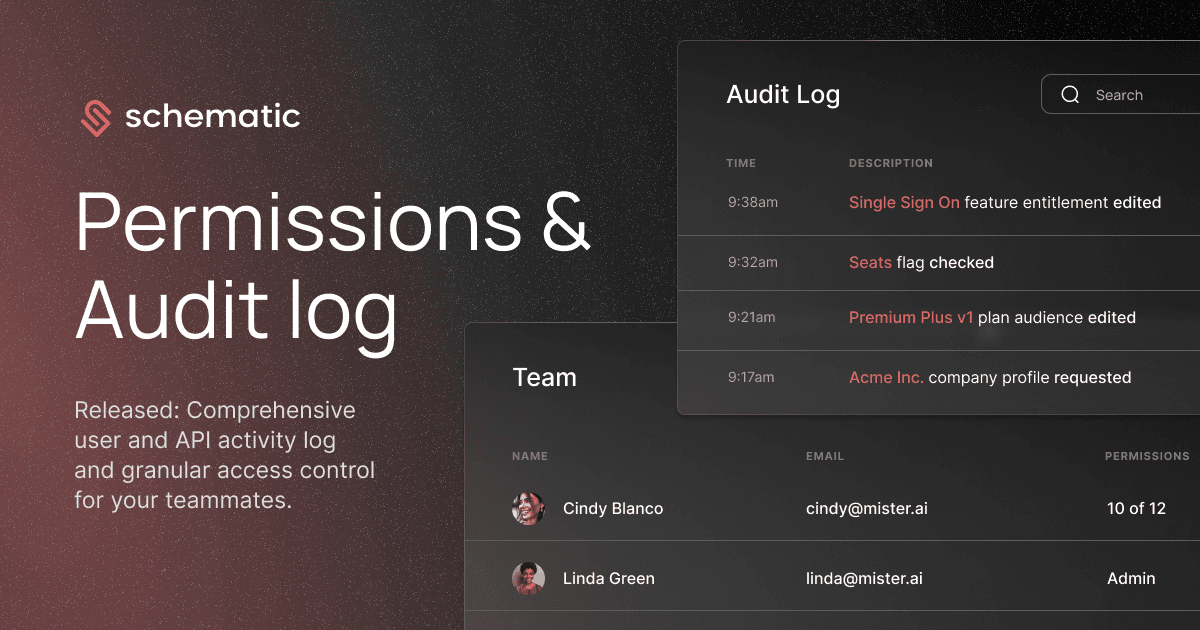
For example, a stored record might show that a “Single Sign On” feature entitlement was edited or that a “Premium Plus v1” plan audience changed inside a production environment.
That level of visibility helps teams investigate issues faster, review production changes with more confidence, and maintain clearer accountability for feature access, pricing, and entitlement updates.
How Schematic Handles SaaS Audit Logs
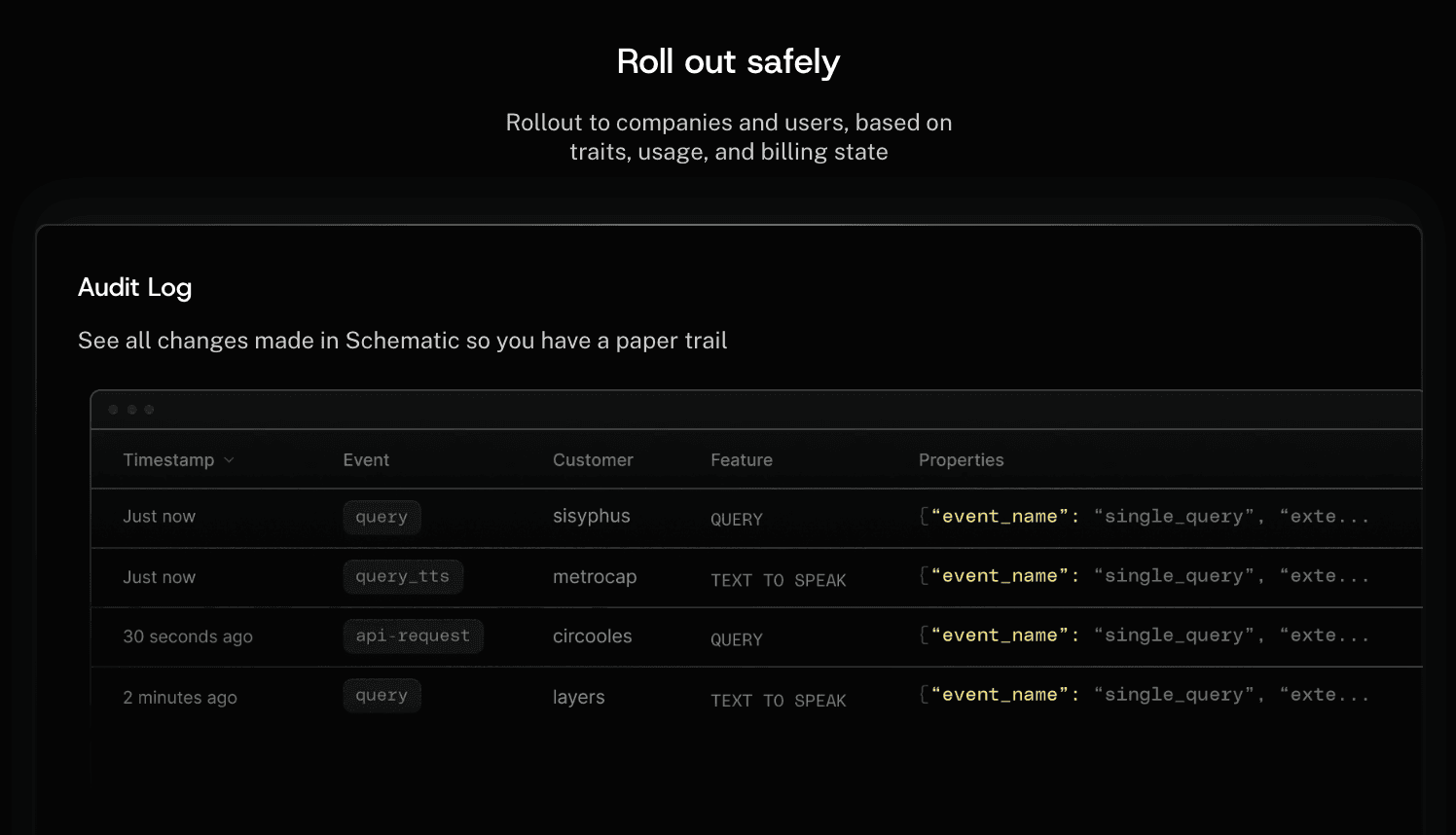
Schematic gives SaaS teams a comprehensive audit logging feature for tracking feature flags, entitlements, plans, user attributes, API requests, and production activity.
Engineering teams can query the API to access a complete history of system activity, while product and business teams can review, search, and filter audit history directly inside the Schematic.
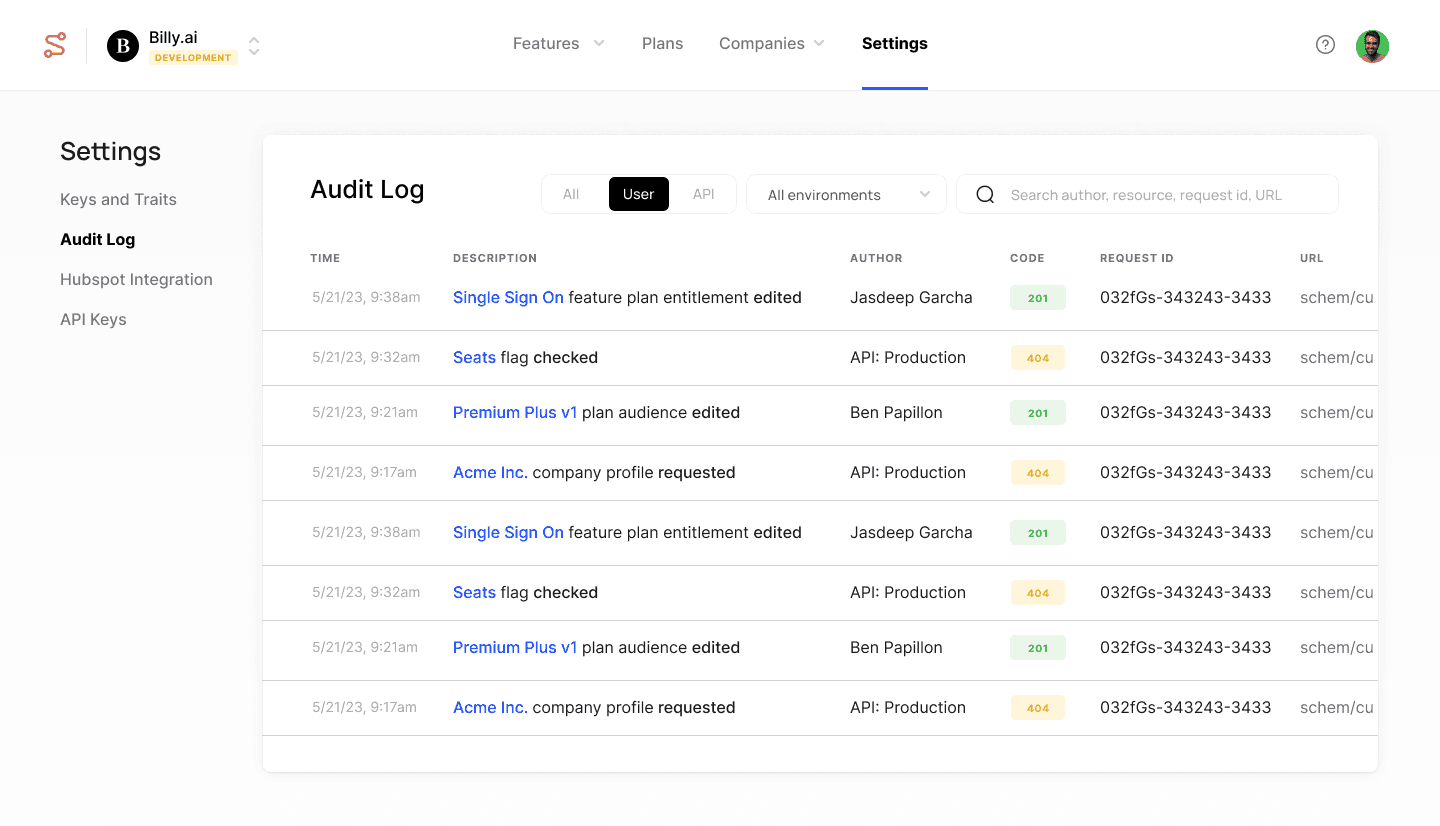
The audit log helps teams trace changes involving feature flags, entitlements, plans, permissions, and environment activity inside the product.
Teams can quickly identify who made a change, when it happened, which resource was affected, and whether the activity came from a user action or API request.
Schematic also helps teams investigate bugs by pinpointing operational changes that coincide with unexpected product behavior.
Activity history can show when a feature entitlement changed, when a plan audience was updated, or when a production request triggered an issue affecting customer access.
Searchable audit history also supports compliance purposes by helping organizations review operational records, monitor system activity, and track how flags, features, plans, and user attributes evolve over time.
What Are SaaS Permissions?
SaaS permissions control what internal users can access or modify inside a platform.
Teams often use permissions to manage who can edit feature flags, pricing configuration, plans, entitlements, environments, or production settings.
Permissions differ from entitlements. Permissions control internal operational access, while entitlements control what customers can access inside the product based on billing state, plans, trials, or usage limits.
Granular permissions become more important as SaaS products grow more complex.
Restricting sensitive production actions to authorized users only helps SaaS vendors reduce risky configuration changes and improve operational accountability.
It also supports internal security strategies related to compliance, regulations, and production access.
How Schematic Handles SaaS Permissions
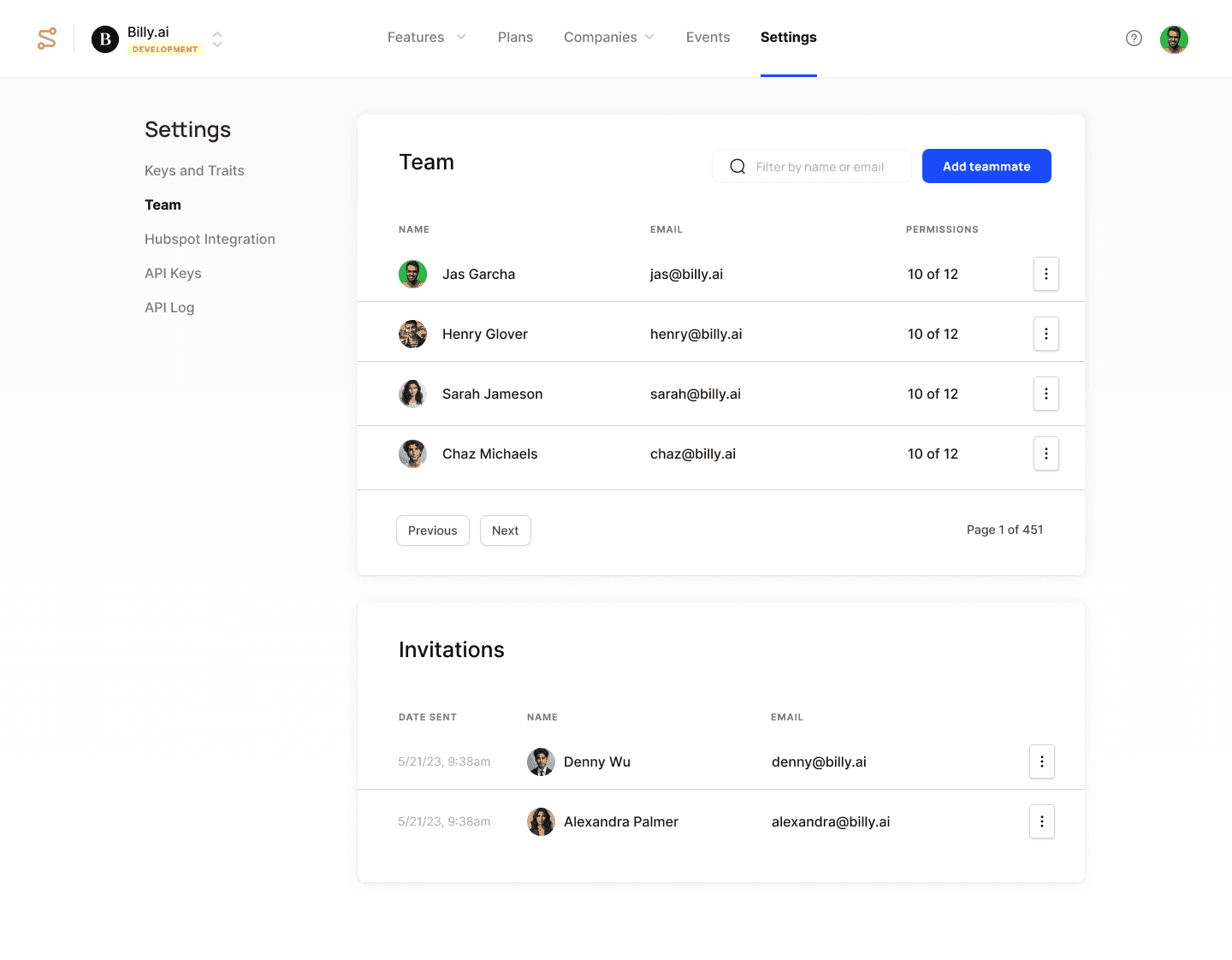
Schematic gives teams granular teammate permissions for managing feature flags, plans, SaaS entitlements, and production environments.
Engineering, product, and business teams can use role-based controls to manage who can create, edit, or delete customer-facing configuration inside the platform.
Teams can assign environment-level permissions for production and development environments while controlling access to plans, feature overrides, flag rules, and entitlement settings.
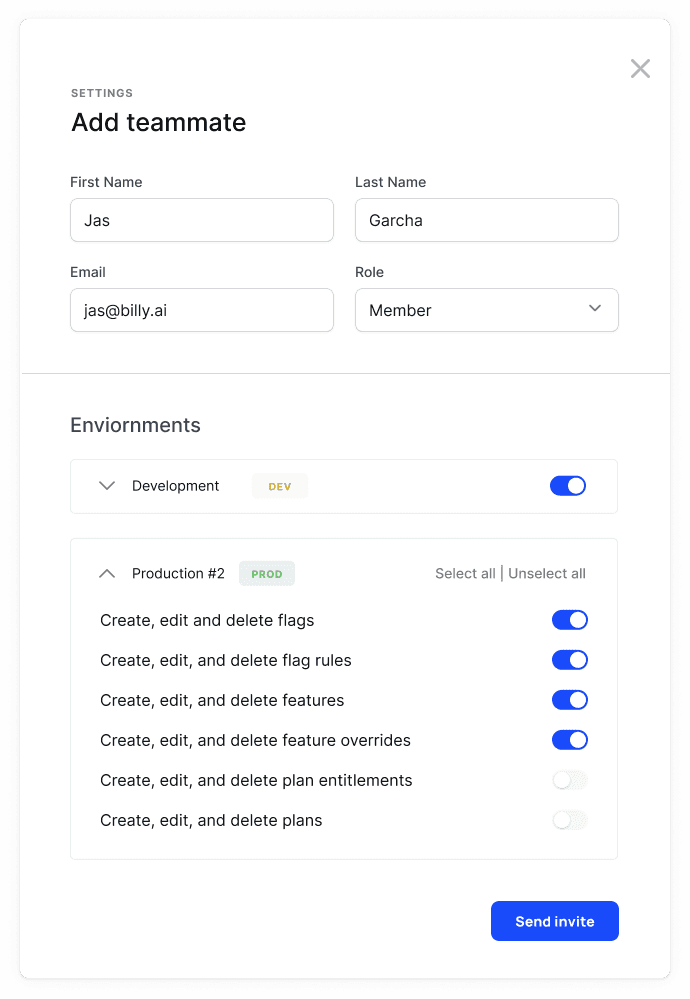
Fine-grained permissions help limit sensitive production environments and customer-facing configuration to authorized users only.
That level of control becomes especially important for SaaS vendors managing complex monetization systems, customer environments, and production changes affecting client access.
Granular permissions also help teams reduce accidental changes, limit unnecessary access, and create more cost-effective operational workflows by improving visibility into who can manage critical system resources.
Why Permissions and Audit Logs Work Together
Permissions and audit logs solve different operational problems inside SaaS products.
Permissions help prevent risky production changes before they happen, while audit logs help teams investigate what changed after an issue occurs.
Different teams often require different levels of access. A solutions architect may need visibility into plans and entitlements without permission to modify production settings.
That combination becomes more important as SaaS monetization systems grow more complex. Feature flags, pricing configuration, entitlements, usage limits, and environment settings often affect billing behavior and customer access in real time.
Granular permissions help teams limit who can modify sensitive production settings, while audit history creates a searchable record covering feature access, plan changes, entitlement updates, and system activity.
Together, those controls improve governance, strengthen accountability, and reduce risk related to pricing and product configuration.
Gain Better Control Over SaaS Audit Logs and Permissions with Schematic
Audit logs help SaaS teams review change history, troubleshoot issues faster, and maintain accountability for product changes over time.
Permissions add another layer of protection by limiting who can update plans, feature flags, entitlements, and production settings.
Those controls become more important as SaaS pricing models, environments, and access rules grow harder to manage.
Built on Stripe, Schematic gives SaaS teams one place to manage audit history, permissions, entitlements, and SaaS monetization controls.
Teams can track platform activity, manage feature access, and review audit history without relying on disconnected internal systems.
FAQs About SaaS Audit Logs
What are the two types of audit logs?
The two most common types of audit logs are system audit logs and user activity audit logs. System audit logs track application events, API activity, system changes, and infrastructure changes. User activity audit logs track actions tied to user accounts, permissions, feature access, and operational changes inside the product.
How do teams audit SaaS applications?
Teams audit SaaS applications by reviewing audit trails tied to configuration changes, API requests, account activity, permissions, feature flags, and entitlement updates. Searchable audit history helps engineering and security teams investigate issues, monitor internal activity, and confirm when changes occurred inside production environments.
What is the difference between permissions and entitlements?
Permissions control what an internal user can do inside a platform, such as editing plans, changing feature flags, or updating environments. Entitlements control what a customer or company can access inside the product based on plans, trials, usage limits, or billing state.
Why is searchable audit history important for SaaS products?
Searchable audit history helps teams investigate operational issues faster without manually piecing together information from multiple systems. It also improves visibility into configuration changes, account activity, feature access updates, and API events tied to production behavior.
How long should SaaS companies retain audit logs?
Audit log retention depends on internal policies, regulatory requirements, customer agreements, and security practices. Some SaaS companies retain logs for a few months, while others archive audit history for several years to support compliance reviews, investigations, and operational analysis.